
Smart thermostat technology has evolved and, in some cases, even regressed over the years. As vendor ecosystems shift, Home Assistant stands out as a reliable, vendor neutral platform. By combining a basic Matter compatible, smart thermostat with Home Assistant’s automation engine, you can build a flexible, powerful, and future proof heating system tailored to your home.

Table of contents
The Smart Thermostat Starting Point
Back in 2018, I decided to upgrade our traditional thermostats to a smart system. My goal was improved control and energy efficiency, and Google’s Nest Learning Thermostat seemed like the perfect solution. Its key attraction was the ‘learning’ and ‘Home/Away Assist,’ a location based automation system designed to intelligently adjust heating when nobody was home.
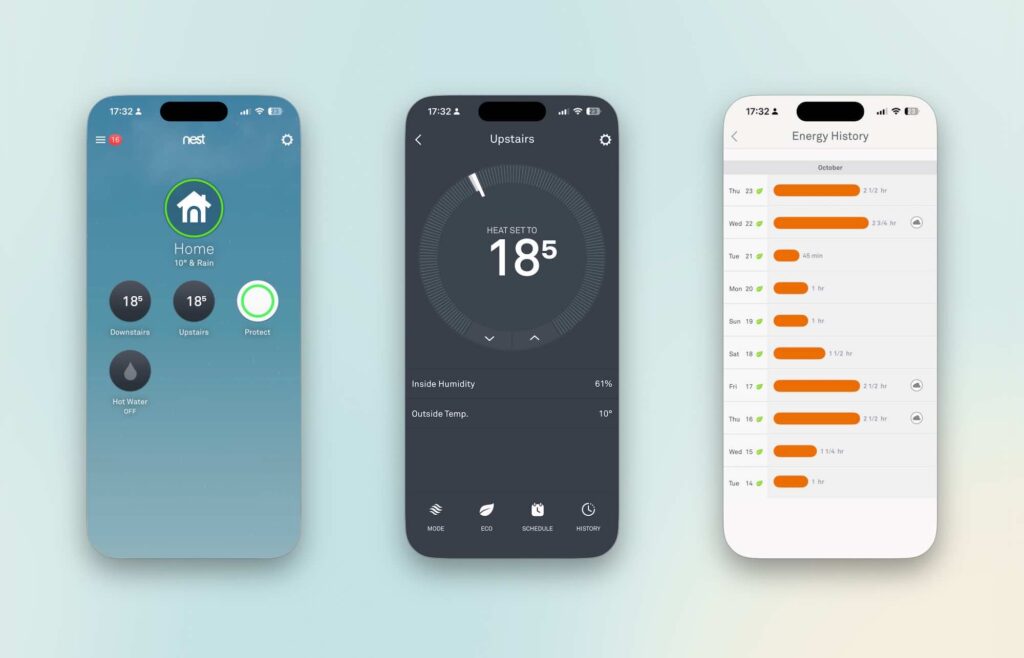
The product showed a lot of promise. I also added Nest Protect devices to the system. These are/were (now sadly discontinued) a terrific smoke and carbon monoxide sensor that also spoke updates and even lit up the pathway out of a room. While the Nest app itself didn’t evolve much over time, there was always the hope that Google would continue to enhance the ecosystem.

The Brilliance of the Starling Home Hub
To increase integration flexibility, I imported a Starling Home Hub from the U.S. (sadly, also now discontinued). The Starling Hub allowed Nest products to interface with Apple HomeKit and Home Assistant. See The Starling Home Hub.
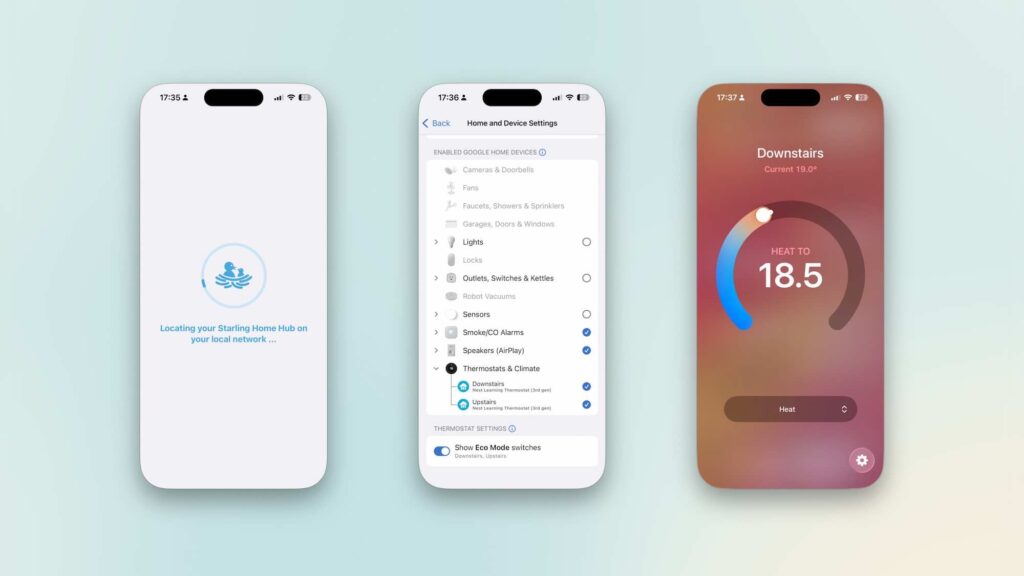
This step significantly improved how “Home/Away” automation worked with multiple family members, offering better overall control and access to heating controls.
The Decline of Nest Support in Europe
As of 2025, the future of Google Nest in the UK/EU looks very uncertain. Google is no longer selling Nest thermostats in this market, and support for the 2nd-generation thermostat ends this week. See: Google Nest Thermostat the end in Europe?
Additionally, changes to the Google API in mid 2025 meant I lost hot water control via the Starling Hub.
On the bright side, the Google Home app received a substantial update finally bringing intuitive control for heating and hot water. Something I had hoped for since 2018. See: Google Home Update Improves Google Nest.
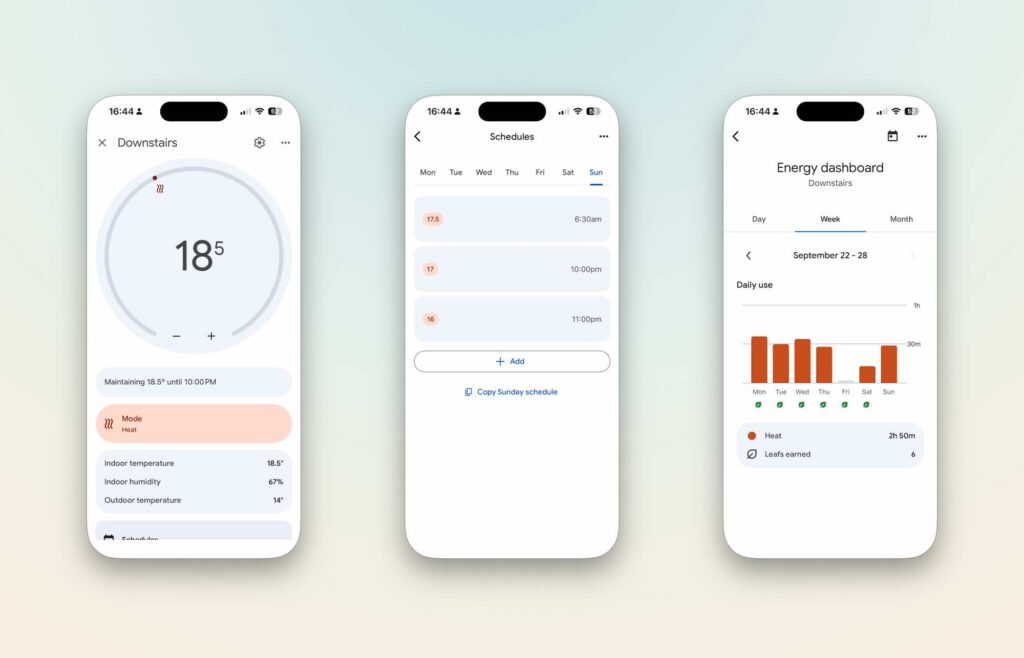
That said, with Nest Generation 2 support ending and no clarity on Gen 3’s long term future, I’m preparing to transition away from Nest entirely. The number of viable alternatives in the UK is limited however; I’m also narrowing down my feature requirements.
The Future: Home Assistant as the Core System
Looking ahead, I plan to move to a Matter based smart thermostat system that supports simple on/off functionality and basic temperature control. All advanced automation and logic will be processed via Home Assistant.
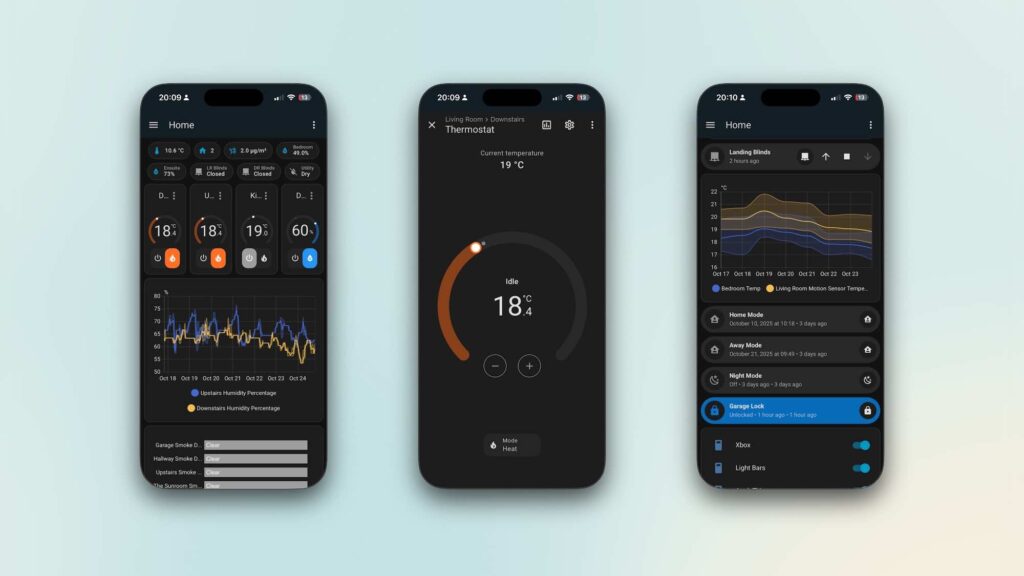
This approach gives me full control and future proofs my smart home setup, regardless of vendor decisions.
Link: Getting Started with Home Assistant Green
Smart Thermostat Control : The Basics
Currently, my Nest thermostat setup in the Google Home App is quite simple, in fact not smart at all.
Heating Schedule for both thermostats:
- 11:00 PM: 17°C
- 11:00 PM: 17.5°C
Hot water also follows a basic scheduled pattern again this basic functionality remains controlled via the Google Home App.
Home Assistant Integration
For now, I continue to employ the Starling Home Hub to bridge Nest with Home Assistant. As mentioned earlier, the Starling Home Hub is discontinued. Once I migrate to a Matter compatible system, Starling will be retired.
If your current thermostat can integrate with Home Assistant either via Matter, MQTT, or another protocol you’ll gain full control over your home’s temperature and heating controls along with powerful automation options.
The following is my ‘no additional integration’ solution for managing home heating in Home Assistant.
I have set one base Home Assistant managed automation to set both thermostats to 18.5°C at 6am. This only triggers if anyone is home, see later on how that works).
Home Assistant Climate Cards
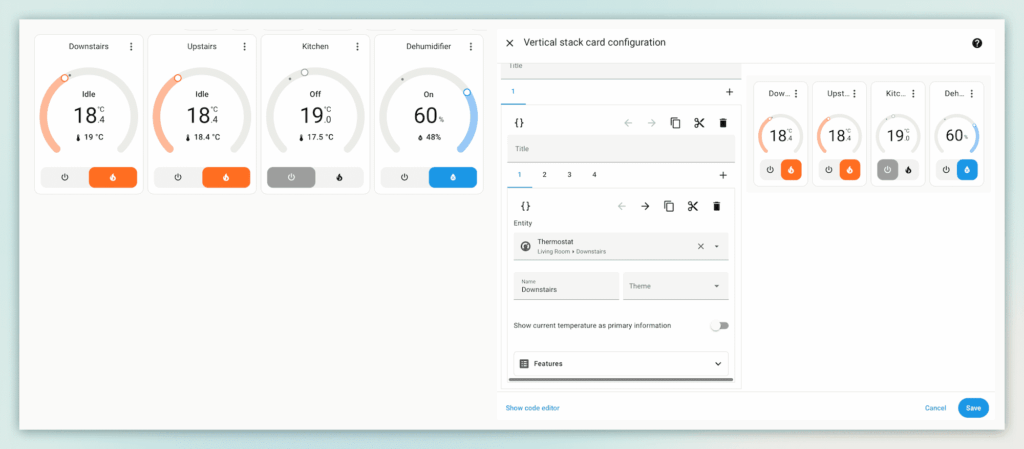
The image below shows my two Nest thermostats on my Home Assistant dashboard. (In addition to an Eve Thermo and my dehumidifier). The target temperature can easily be adjusted directly from this dashboard.
The card glows red when the heating is active. The right hand side of the image shows the dashboard in edit mode, a simple vertical stack of climate cards.
Additional Temperature Sensors as Inputs
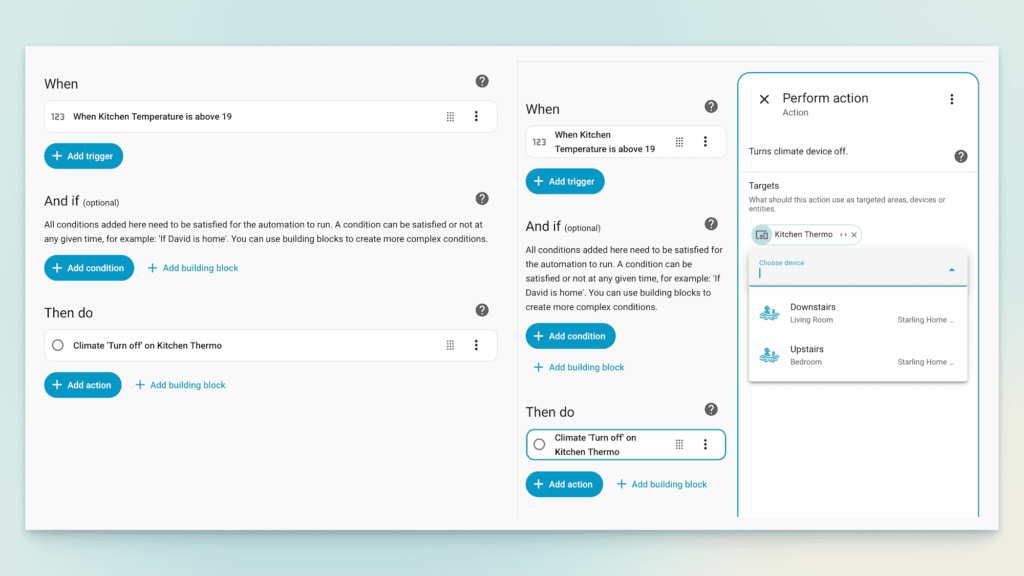
Using Home Assistant to manage your heating means you are no longer restricted to the temperature sensor built into the thermostat. You can now use any temperature sensor in a room to trigger automations.
The following is an example automation that uses the temperature measurement for a Hue Motion Sensor to turn off the kitchen Eve thermo once it reaches 19 degrees. You can see on the right hand side (in edit mode) that I could have applied this automation to any of my thermostats.
Tracking Temperature in Home Assistant
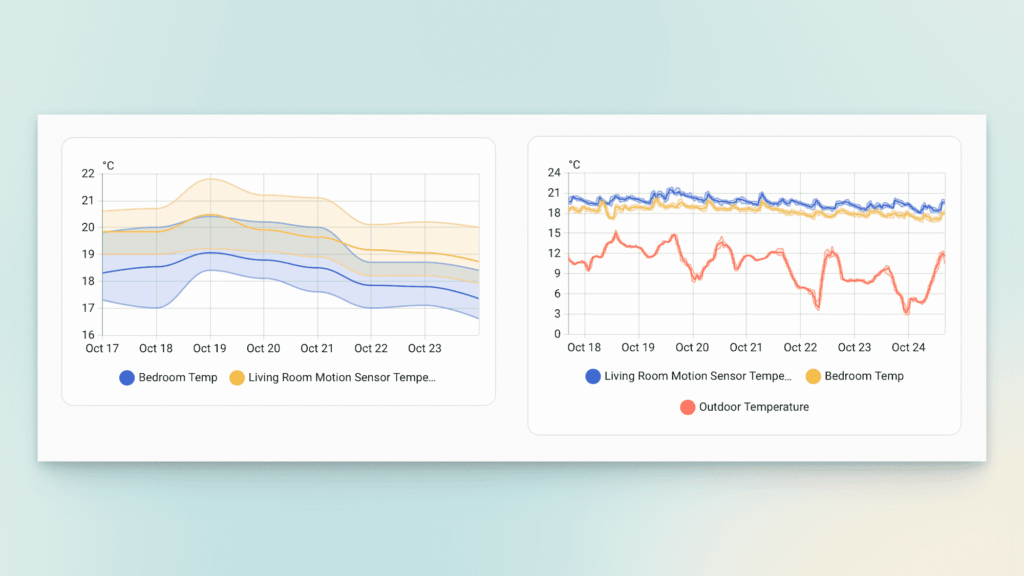
The following image shows two graph cards I have on my default dashboard. The first shows the temperature change over a day. The Second graph reviews a longer duration and tracks both thermostats against outdoor temperature. See: The Home Assistant Weather Station.
I have created a Home Assistant automation that is called at 5.30am to check if the outdoor temperature is less than 5°C. If that is true, and the house is populated (see later) the target temperature is set to 18.5°C. Basically the house starts to heat half an hour earlier than usual.
Home Assistant Window Automations
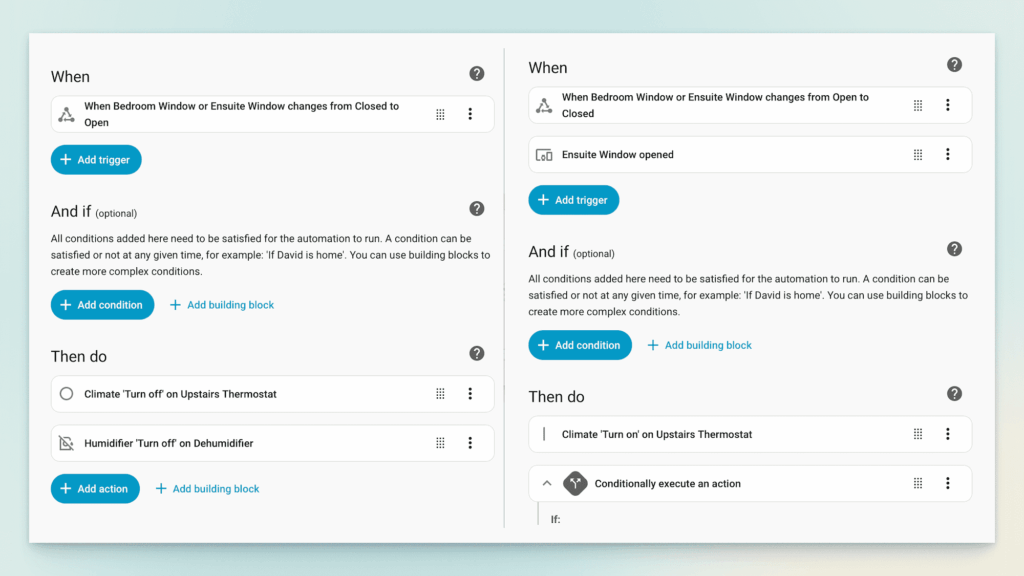
I have a number of automations triggered by windows opening and closing. If a window opens the thermostat is set to off mode. The opposite is true once the window closes.
Matter Window Sensors:
Eve Door & Window (Amazon Ad)
Aqara Window Sensor (Amazon Ad)
Smart Thermostat: Geo Automations
Please note, you need to be able to access your Home Assistant system remotely to use this feature. See: Nabu Cassa for one example.
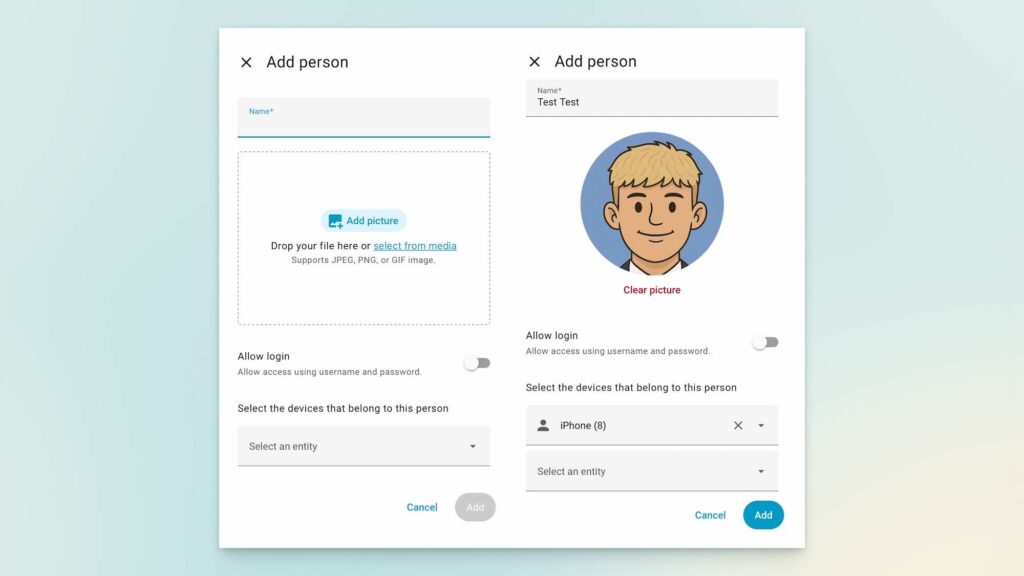
This automation requires all household members to run Home Assistant on their mobile devices and be logged in.
Adding People to Home Assistant
- Step 1 – Add the new person/user via your main Home Assistant account.
- Step 2 – Have the new user log in to their account on their device.
- Step 3 – In the main account, click on the user and select their mobile phone as the tracking device.
Home Assistant Zones
This feature is where Home Assistant truly stands out. On other platforms, it’s almost impossible to determine which user has triggered an automation. With HomeKit, I had reached the point where my Reminders app would prompt me to check whether Away Mode was activated each day. There was simply no way to trace or error-check in HomeKit.
In addition, Home Assistant also features “zones.” Zones can be set for any location you visit regularly, and you can trigger automations for when you leave or enter a zone.
Home Count Method
My main control looks at the number of family members at home. When this count reaches zero, the away temperature (17°C) is set on both thermostats.
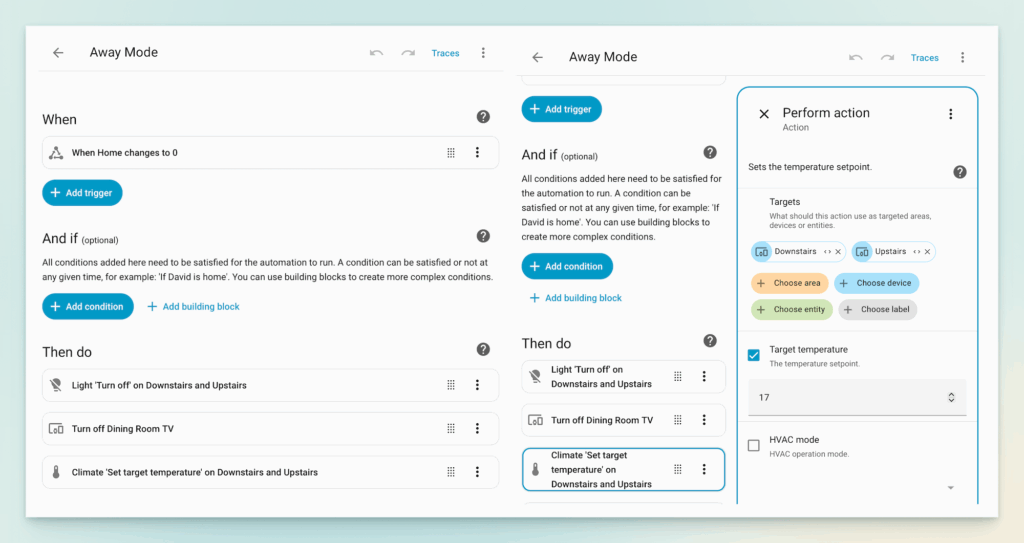
When Home > 0, the heating switches back to home mode.
To do this, you set your home as a “zone.” Simply open the Home Assistant app on your phone, click on a user, and Home Assistant will display a map.
There is an option on this screen to create a zone. I made this quite large.
Automations for Specific Zones
You can also set zones for specific locations. For example, I created a zone for my wife’s workplace and triggered an automation for when she leaves that zone between certain hours (i.e., at the end of the working day). See below.
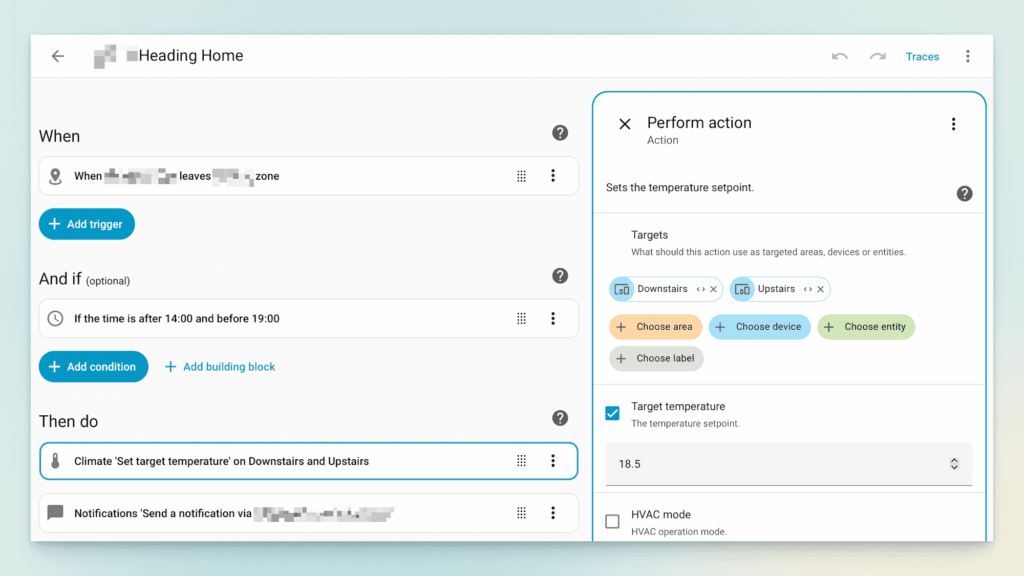
There is quite a bit of scope for geo-related automation, even beyond the heating model. You can, for instance, set an automation to notify those at home that someone is on their way back, so dinner can be ready when they arrive.
Tracking Boiler Activity via Home Assistant
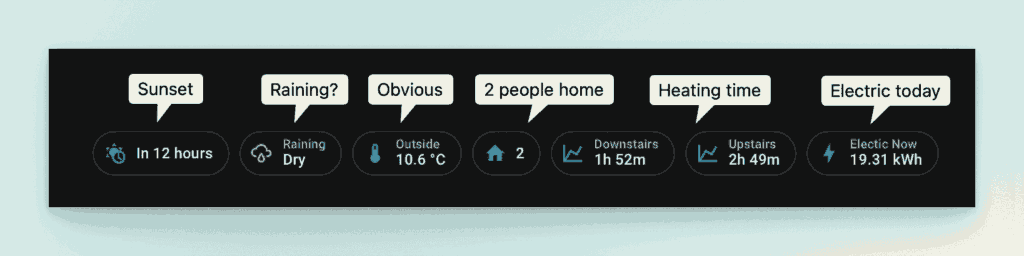
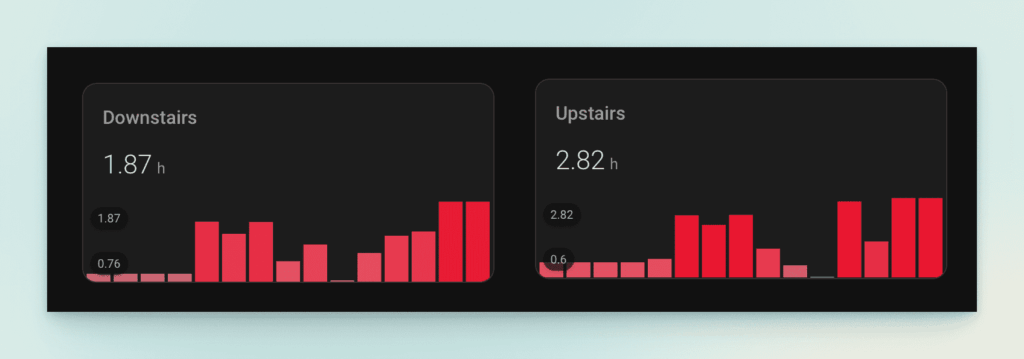
Not unlike the Nest Home Report, I decided I’d like to track the duration each thermostat was set to ‘heat.’ I reached out on the Home Assistant Reddit forum, technogeek61 came up with a great solution that allowed the heating to be logged. I then added this data to the dashboard in two forms: an entity field at the top (for today) and a 14-day view in graphical format.
Use the following code at your own risk.
First, create a sensor that resets daily to track how long the heat was running today in sensor.yaml:
# collect how long the heat ran today
- platform: history_stats
  name: Heating Today
  unique_id: 5b8b5330-72af-4f74-b116-dca4f12bb209
  entity_id: sensor.heat_activity
  state: "heating"
  type: time
  start: "{{ now().replace(hour=0).replace(minute=0).replace(second=0) }}"
  end: "{{ now() }}"# collect how long the heat ran today
Next, create a template sensor in the template.yaml (you need to change where you are detecting that the heat is running – this is what I have for my downstairs.therm):
- sensor:
    - name: Heat Activity
      state: "{{ state_attr('climate.downstairs.therm','hvac_action') }}"- sensor:
Finally, add the following additional code to template.yaml
# if the action shows that the heat is running, save that in a binary sensor
# this will then be used in the sensor.yaml to track how long the heat was on today
- binary_sensor:
    - name: Heat Running
      state: >
        {{ is_state('sensor.heat_activity', 'heating') }}
Here is the graph showing the heating activity in hours of both thermostats.
Google Nest Hot Water Control
I still haven’t managed to find a reliable way to manage hot water control. Starling was initially able to access Google Nest’s hot water control; however, this changed following recent updates to the Google API. I still rely on the Google Home app to boost water heating. (I’m not sure whether Matter thermostats allow direct hot water control in Home Assistant?)
Smart Thermostat : Conclusion
This is my bare-bones solution to the smart home heating challenge. It’s not perfect, but it works for us. The motivation behind this model was to create a process that doesn’t rely on a specific thermostat’s services.
When the inevitable happens and my Google Nest v3 thermostats reach end of life, I’ll be looking for a simpler replacement that allows Home Assistant (or even HomeKit) to take over management. This includes geo services and automation. If anyone has better suggestions or models, please share them in the comments.
There are likely many better ways to manage thermostats in Home Assistant, please share any suggestions in the comments below.
Amazon Links
Tado Thermostat
Eve Door & Window
Aqara Window Sensor
Eve Thermo
As an Amazon Associate this website earns from qualifying purchases.
Follow the Smart Home Blog
We would love if you could follow our social accounts (Instagram X Facebook Bluesky). You can also follow us via our RSS Feed or even receive our new posts (no spam) via this subscribe form.

Discover more from The Smart Home Blog
Subscribe to get the latest posts sent to your email.