
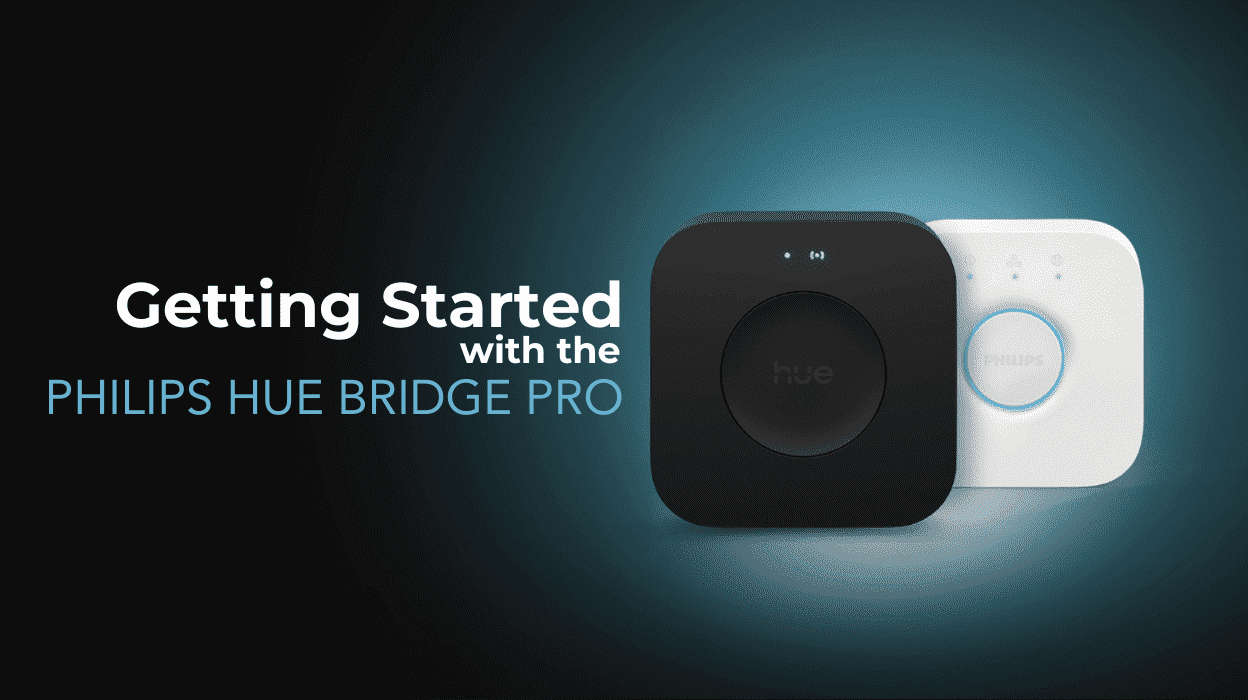
Almost a decade after the launch of the Philips Hue Bridge v2, Philips has introduced the Hue Bridge Pro. This new iteration marks a significant milestone in the evolution of the Philips Hue smart lighting ecosystem.
The Philips Hue Bridge Pro on Amazon [Ad] has been the reliable heart of my Hue system for nearly eight years. It was designed to support a modest number of lights and accessories, making it perfect for smaller setups.
However, as smart home technology has rapidly advanced, so too have the needs of users looking for more powerful, scalable, and feature-rich solutions.

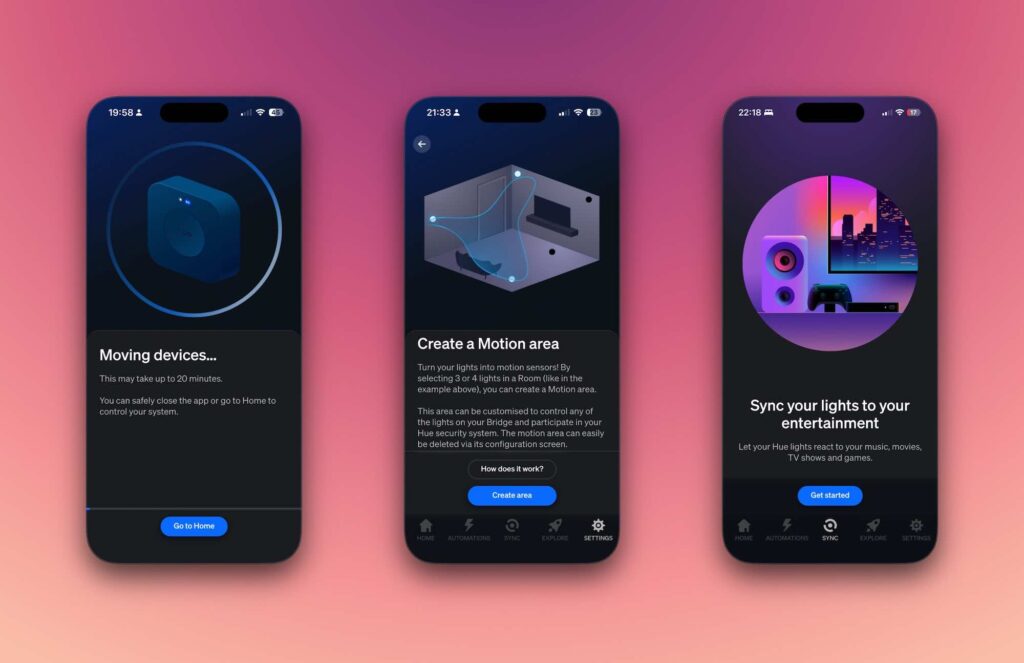
Table of contents
Welcome the Hue Bridge Pro
The Bridge Pro supports up to 150 lights and 50+ accessories, Wi-Fi and Ethernet connectivity, and advanced motion sensing capabilities. The Bridge Pro is designed to meet the demands of today’s larger, more complex smart homes. It pushes the boundaries of smart lighting control while remaining compatible with the existing Hue ecosystem.
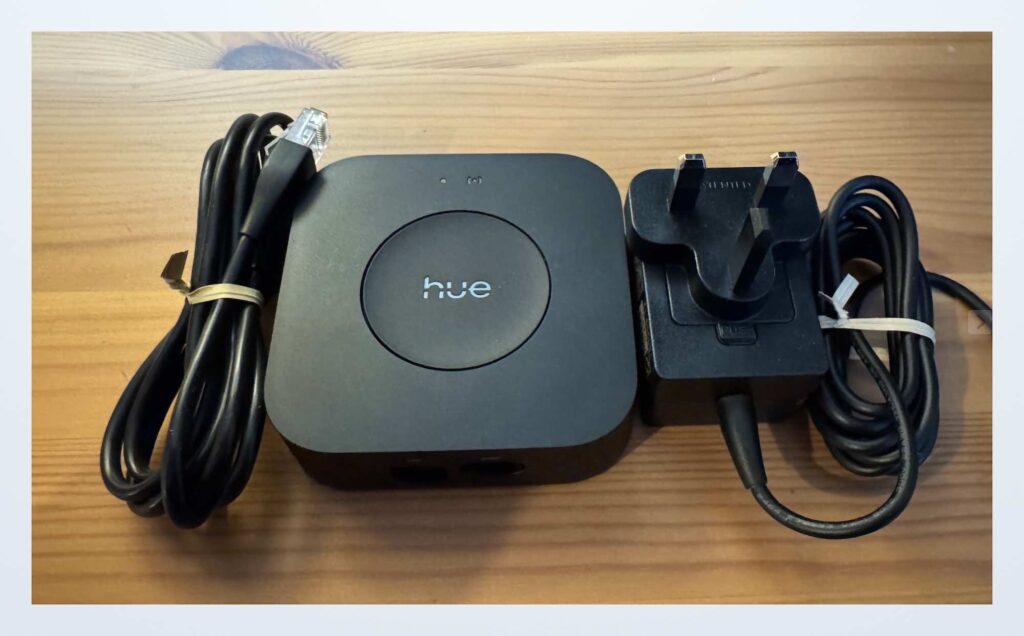
The new Bridge Pro offers an enhanced user experience with improved speed, security, and an upgraded “Hue Chip Pro” designed for seamless integration with the latest smart home standards. Philips Hue Bridge Pro on Amazon [Ad]
Click here to view a side by side comparison of the Philips Hue Bridge v2 and Hue Bridge Pro.
| Feature | Philips Hue Bridge (v2) | Philips Hue Bridge Pro |
|---|---|---|
| Max Lights Supported | ~50 | 150+ lights (approx. 3× more) |
| Max Accessories | ~12 | 50+ accessories |
| Scenes Stored | ~200 max | Up to 500 custom scenes |
| Processor & Memory | Basic older hardware | “Hue Chip Pro”: quad-core 1.7 GHz, ~1 GB+ DDR4 RAM, 8 GB flash/EEPROM |
| Connectivity | Ethernet only | Ethernet and Wi‑Fi |
| Power Connector | Barrel-style AC adapter | USB‑C power input |
| Motion Detection (MotionAware) | Not supported | Yes — turns Hue lights into motion sensors with RF‑sensing (soft sensors) |
| Security & Encryption | Standard AES‑128 per device | Enhanced AES‑128 full system encryption via Zigbee Trust Centre |
| Apple HomeKit / Alexa / Google / SmartThings / Matter support | Supported | Supported |
| Pricing (approximate) | £49.99 (Amazon Ad) | £79.99 (Amazon Ad) |
| Migration & Consolidation Tools | Manual re-setup | Supports migration tool from old Bridge, with multi‑Bridge consolidation coming later in 2025 |
How to Migrate to Philips Hue Bridge Pro
It is always wise to ensure everything on your existing Hue network is up to date. Make sure your Hue app, Hue Bridge (v2), and all lights are updated to the latest firmware.
The following instructions offer a guide on how to migrate your Hue devices to the new Hue Bridge Pro.
Power on the Bridge Pro
Plug it in via USB-C and connect it to Ethernet or Wi‑Fi.
Let it boot up, wait until the light turns solid blue.
Open the Hue app
Go to: Settings > Hue Bridges > Add Bridge
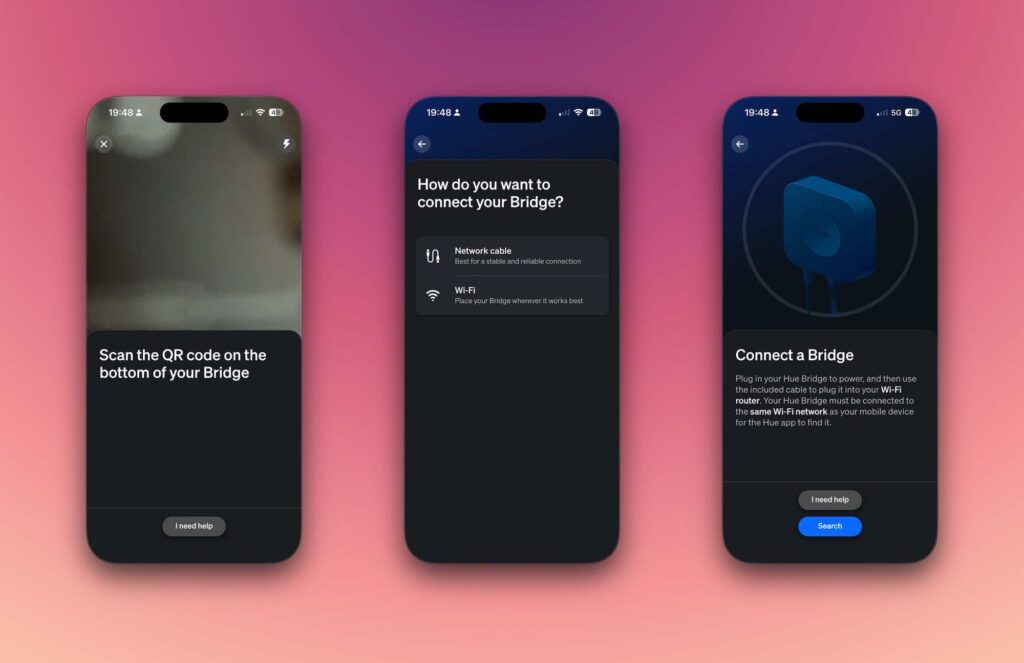
Add your new Bridge Pro
Scan the QR code on the back of the new Bridge. The app will detect the new Bridge Pro is nearby. Select the device and follow the on-screen instructions.
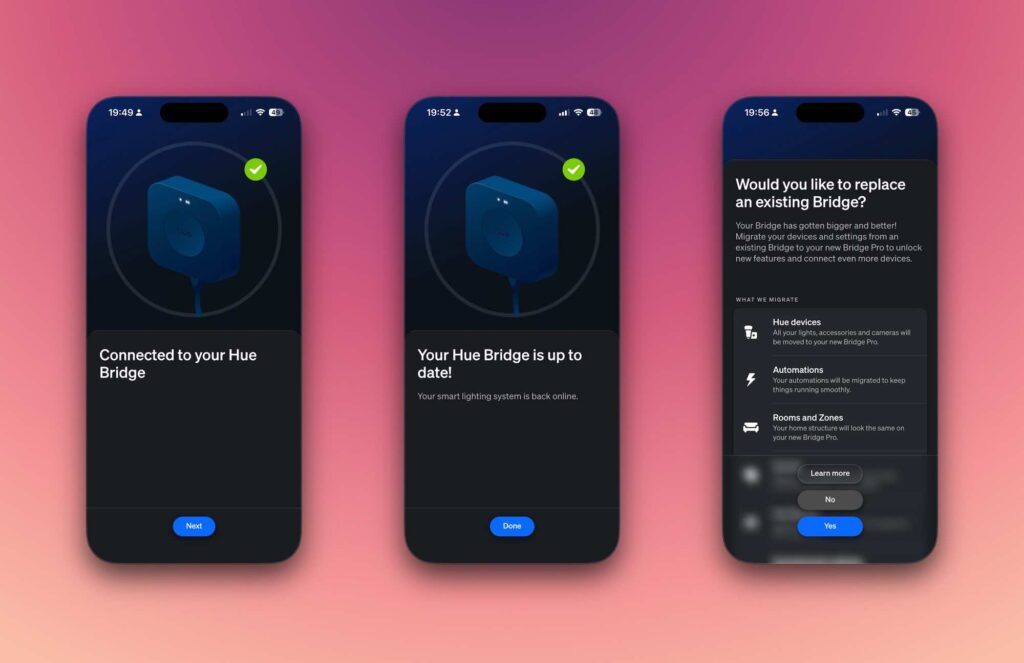
Start the migration
When prompted, choose “Migrate from existing Bridge”.
When asked, press the physical button on your old Hue Bridge (v2) to authorise data transfer. Note, all Hue devices must be reachable for effective migration.
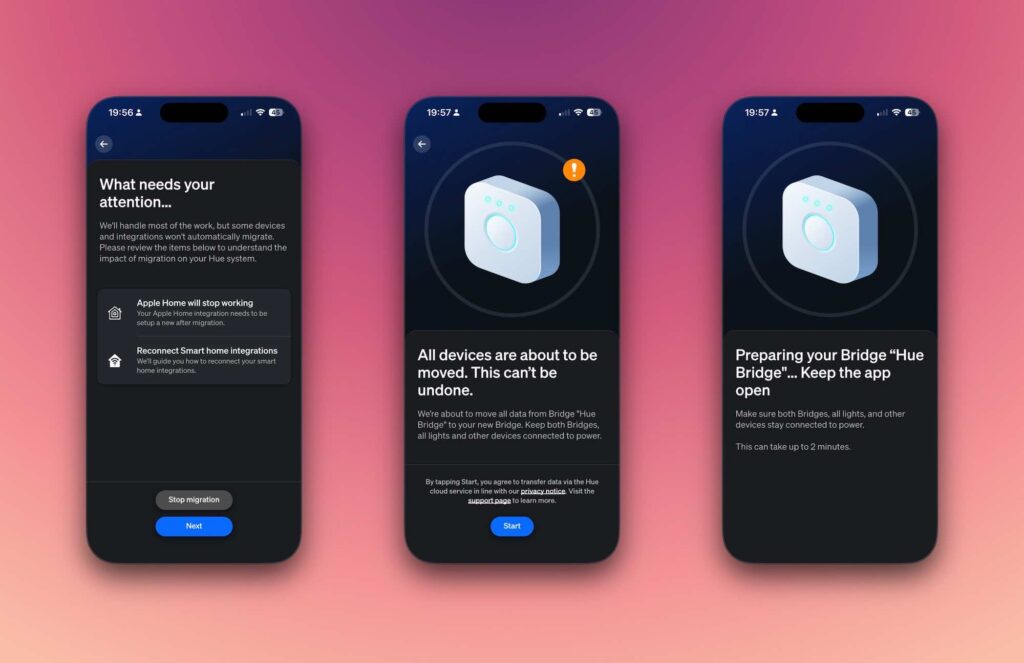
The app will now transfer your lights, rooms & zones, scenes, automations and accessories (remotes, switches, sensors).
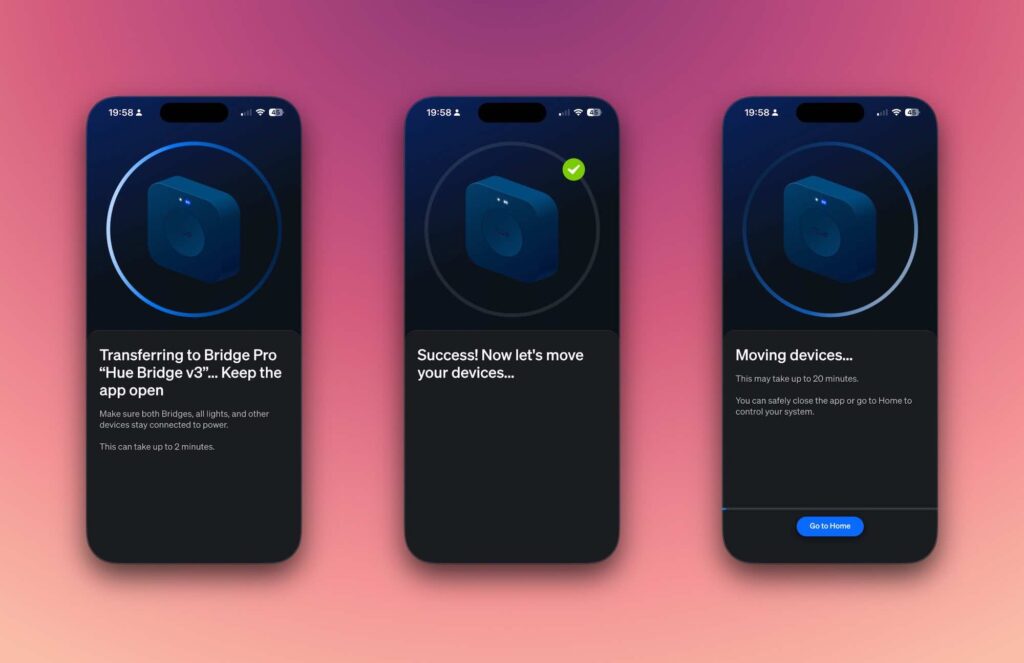
Wait for migration to complete
This process may take a few minutes depending on setup size.
Avoid unplugging either Bridge.
Re-link Integrations
Re-link Alexa, Google or Apple HomeKit integrations to the new Bridge Pro.
Hue Bridge Pro in Apple Home
Unfortunately this is a fresh start approach. First you need to remove the previous Hue Bridge from your HomeKit installation.
Unfortunately, Apple HomeKit requires a fresh setup. You’ll need to remove the old Hue Bridge before adding the new one.
- In the Home app, tap the three dots (top-right).
- Scroll down to Bridges, tap your Hue Bridge, then select Remove.
- In the Hue app, go to Settings > Smart Home > Apple Home and add the new Bridge Pro.
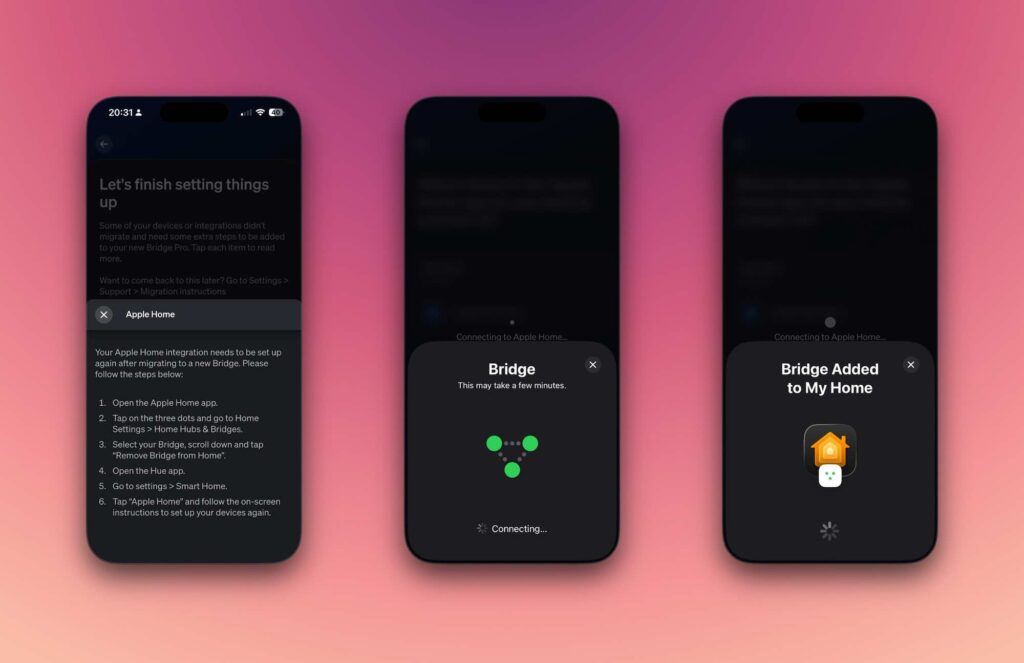
Hue will now take you through each device and ask to which room should it be added. This can take an age, however, I found when I loaded the Home App on my Mac all of the Hue Lights were in the default room. It took little or no time to drag them to the correct rooms. This is certainly quicker than going through the multiple steps in the Hue app.
See : Getting started with Apple Home
Home Bridge Pro in Home Assistant
Migration in Home Assistant is straightforward. Add the new Bridge Pro by pressing its button when prompted. This links it directly to Home Assistant.
During the process, resources are transferred from Bridge v2 to the Bridge Pro while retaining their identifiers. You can then safely remove the old bridge from your installation.
Home Bridge Pro in Google Home
As Google Home links via the Hue account (Works with Google Programme) there was no real migration required. On loading Google Home I found the new bridge already in place and all lights and automations responded as normal.
Hue MotionAware
The Philips Hue Bridge Pro [Amazon Ad] introduces an exciting new feature that allows your lighting system to respond seamlessly to your movements throughout the home.
By using at least three lights in the same room, you can set up a motion area that detects your presence and automatically activates any lights you’ve assigned to it.
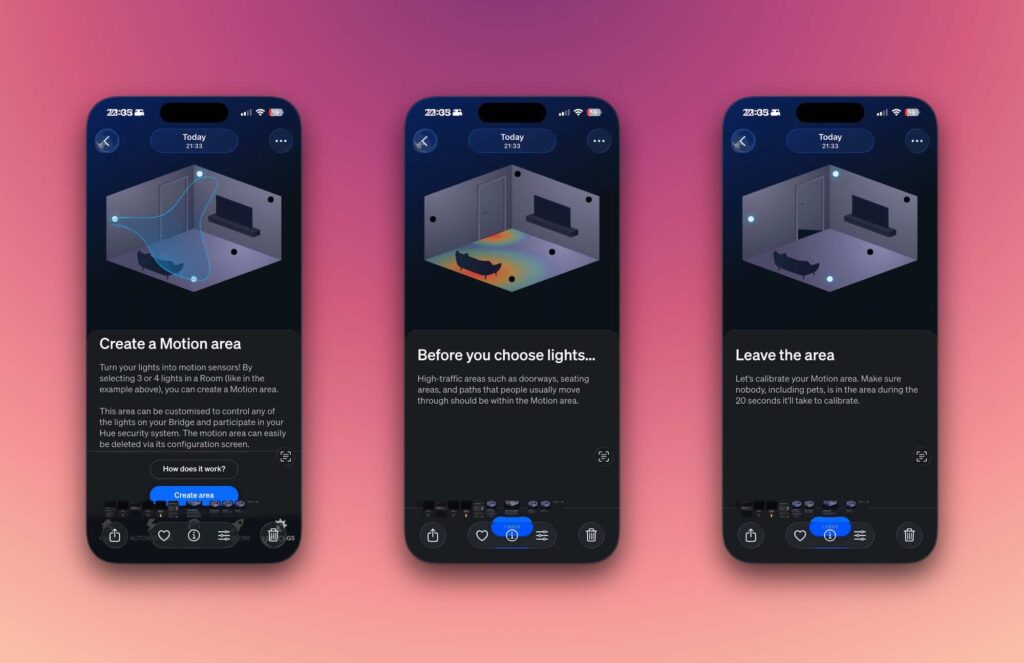
Select Lights: Choose the lights that are both reachable and compatible. Once selected, the lights will begin blinking to confirm they’re the right ones. Be sure to follow the criteria shown in the app for optimal performance.
Calibrate the Area: Step out of the area and ensure it’s clear of people and pets during the scan and calibration process.
Customise the Response: Choose how the system should react when motion is detected. You can control the lights, send alerts, or set up both options.
Although I suspect the Hue Motion sensor may offer a quicker response time, Hue MotionAware is really quite impressive. The Hue website notes the need for compatible lights. I have been using Hue lights for many years and was pleasantly surprised to discover all the devices appear to be compatible. If you are looking for a presence sensing solution, check out our review of the Aqara Presence Sensor FP2.
Current Limitations
At launch, the system supports automatic migration of only one bridge. Philips has promised that migrating multiple bridges to the Hue Bridge Pro will be possible “soon.”
Conclusion
It took me around 30 minutes to migrate my 50 Hue devices to the Bridge Pro. Updating Home Assistant took two minutes, while Google Home updated instantly. The biggest challenge was reconfiguring Apple HomeKit, which required about an hour.
The Hue Bridge Pro delivers:
- 3× the capacity (150+ lights, 50+ accessories, 500 scenes)
- 5× faster performance with the new Hue Chip Pro
- Advanced MotionAware functionality
- Stronger security, including Zigbee Trust Centre encryption
The Hue Bridge Pro is a natural upgrade for any Hue household. At the same time, it’s worth celebrating the longevity of the Hue Bridge v2, a rare smart home device that remained relevant for over a decade.
Happy upgrading!
Links
Philips Hue Bridge Pro on Amazon [Ad]
Getting Started with Apple Home
Our Favourite Smart Home Devices

Discover more from The Smart Home Blog
Subscribe to get the latest posts sent to your email.